Posts

Showing posts with the label free

...and K001FX is finally Released!

Image
...in a "as is" edition. Yup, more than a year was enough for me to figure that I had to release this as it is and don't bother to make a proper song demoing every little feature with the detail I wanted, nor making a .pdf document explaining the use and custom changes anyone could make to every device I had. So... here it is "as is" and I hope those that kept requesting this either through mail, comments or YouTube messages can now enjoy this... finally! :) K001FX - Koshdukai's FX Machines 001 microReFill "as is" Edition So, what's in the "package" uh ? Besides the Effect devices you see in the picture, you can also find in there 3 very small .rns songs that try to do some simple demoing of 3 of the devices. Nothing fancy, just some REX files with the device as an insert FX. You'll find that ReGRAINZeR V.0.9 now allows you to engage a Fake Pitch-shift-like playable mode, by turning Rotary 3 full clockwi...
Record 1.0.1 is out!

Record 1.0.1 was just announced ! =D What's all the hassle about such a "minor" fix/update ? Well, for starters, Master Section got the missing "In" I was complaining about in my previous post :D • Advanced MIDI Device: Master Section: In was not available as target That's the good news, the bad news is that I forgot that using Advanced MIDI Device ports redirection to devices, bypasses the Remote layer (where all the conversion/mapping occurs), so... just setting Axiom faders to Channel 16 and redirecting it to the Master Section wasn't enough. Anyway... all to say that, the workaround explained in my previous post, is still valid for the purpose I described. But, it's good news that the missing "In" is now there where it should! Now, the BIG news. IMHO, is: • Import multiple audio files feature added This, to me, was the most important "fix" (i.e. new feature) brought by Record 1.0.1 Record now can really shine as a mastering ...

Random access to a CV values list

Just added this little CV tool in the free download section (on the right): "K's Basics - Random access to a CV values list" It's basically a way to access through CV indexing, a list of 3x32 "cells" of CV values (well, one of the list is within the Note range of CV values, but this example is enough to demo the concept). So, if you're ever in need of generating a specific sequence of CV values controlled by another CV source, this is one way to do it :) It's like having random or sequential access (in whatever direction you want) to a specific custom list of CV or note values, by using a CV controlled "cursor" (just connect the CV "cursor" source to the Rotary 1 CV input and tweak the Combinator modulation programmer Min/Max values to your needs). This device was enough for something I was testing, but I'm sure it can be optimized with some thought and more time. It won't work well in a real-time fast switching situation,...

Quick Tip: CV Delay

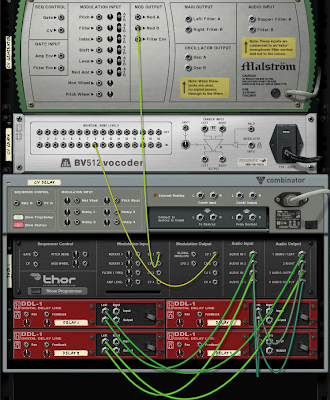
Image
A "CV Delay" is quite easy to do once you have a way to convert CV to Audio and Audio to CV (you can use the CV2Audio2CV for that). A simple way to achieve this with up to 4 independent CV signals, is to use Thor's Audio outputs connected to 4 DDL-1's and back again through Thor's Audio inputs: (click to zoom) So, to test all 4 CV delayed signals, I'll use BV512's CV inputs to graphically show what's going on: (click to zoom) Now, let's check the front and see if the CV Delay is working... (click to zoom) ...and there you have it, a working 4x CV Delay:) Next post I'll talk about some of the devices and the way I usually use them for CV display (more like CV debugging, really). I'll talk about the use of the DDL-1, MClass Equalizer, RV7000, BV512, Thor and PEQ-2 as possible CV debugging tools. After that, the obvious way to do a rudimentary CV Scope using a stack of 4 CV Delay units :) ...as you can guess from the above pictures, it's ...

Quick Tip: CV2Audio2CV

Image
I guess it's common knowledge that Thor is much more than a very powerful synth :) Besides being a very powerful versatile multi-filter+effects device, it's also a very capable CV machine, capable of very cool and useful CV processing and generation. I have many basic patches at hand that I use as basic building blocks to build more complex combinators. Some I've already mentioned here, but many others I keep to myself because there are already equivalent devices made by others before me, or some are so basic (although useful) that I think it would be kind of weird to mention them here. Recent events lead me to change this idea a bit. I'm beginning to realize that what some may consider as basic knowledge, it may be news to others, so why not make some quick posts about it ? So, this post will quickly show a very useful use of Thor's modulation matrix and input'n'outputs at the back. This little patch deals with CV to Audio and Audio to CV: (click to zoom) S...

Akai MPD24 (Special) Remote codecs - Part I

I'm currently working on a special version of a Remote Codec for the Akai MPD24 (much like the one I did for my M-Audio MidAir 25). The plan is, to take advantage of a mode where each of its 16 Pads sends a 'Program Change' message (from 1 to 16), to jump directly to (well, select) the respective sequencer track within those limits. It's mainly a derivative of the algorithm I've used in the Trust and MidAir codecs, although with some limitations to work properly for the MPD24. This was more or less a forum request (well, maybe more like a "oh, I can do that, really? How? Can you show me?" kinda thing). I've already sent my first test draft to the (fellow forum member) requester to see if it works or not (fingers crossed!), since I don't own an MPD24 (unfortunately!) so only he can test it and give some feedback. As soon as we're happy with the result, I'll add this "Akai MPD24 (Special)" Remote Codec to the free download codecs li...

KFXmachines - ReGRAINZeR V.0.6.2beta DEMO release

Image
I've decided to release a little demo .RPS file with the latest version of ReGRAINZeR and wait a while to see what happens :) About this little demo: It uses 2 demo units. One applied to a drum REX dual loop Combinator, and the other to a guitar REX also dual loop Combinator. Both units are using the C1 to B1 MIDI keyboard octave keys. Key mappings are shown on the help screen, on the right of the device. On that screen, P stands for Pitch Wheel, M for Mod.Wheel and R1 for Rotary 1. Gate effect (stutter) is activated by pressing D1# or through Aftertouch, if that option is turned on. Speed is controlled by the Mod.Wheel. External Control CV Output is not implemented on V.0.6.x After listening to the example performance made with both units, you can (should) mute or delete the performance clips and play a bit with each of the ReGRAINZeR demo units. You could also copy any devices+tracks of a song of yours and paste it within this demo song, and after some rack rewiring at the back, ...

Remote Codecs released...

Image
...and more on the way :) I'm releasing some Remote Codec packs for the M-Audio MidAir MIDI Wireless Keyboard series and two other more obscure keyboards I own. So here are the links: Trust (mini) MIDI Keyboard Remote Codec (this one will support the infinite 'Program Change' Value-to-Delta algorithm, because this little keyboard does something quite useful: as soon as 'Program Change' reaches 128 it restarts at 1 again. It also does the reverse of course, when reaching 1, if 'PROG -' is pressed again, it jumps to 128. This allows me to make it truly endless to the "eyes" of Reason, no matter at what value the keyboard is, it will always return a +1 or -1 delta to Reason. This is why I made Patch selection the default control for this one) QuickShot MIDI Composer Remote Codec (just a simple generic codec, with correct name, thumbnail picture and 'Data Entry Fader' set to control every device 'Master Volume') M-...

FAQ: Will ReGRAINZeR be released as freeware ?

Image
Well, I have this guideline I try to more or less stick with: If it's something I did mainly with, for or through freeware, its my duty (and I'm glad) to give it back to the community for free. I guess this is the best way to thank the ones before me that made something for free that I could use, and keep the thing rolling :) If I had to buy or pay for something, then I try to jump in the bandwagon and give a run of my dedicated time and effort for the money, as the ones before me also did. I try to make available for free, things that may help to make a point, prove a concept or help fellow Reason users / forum members to understand something, some concepts or some cool ideas that I have no time to develop, planting the seed for someone to take it and further develop it. Things like these pre-Reason4 oldies: So, to answer your question: I'm planning to release ReGRAINZeR (along with other devices I'm still trying to develop) in a future ReFill, sold (hopefully) through...

REXTrigga

Image
While browsing the "Feature Suggestions" forum, I saw descathach 's "ReLive" post and decided to explore what could be done about it. So, I'm now playing with REXTrigga (formerly named, incorrectly, as LoopTrigga) a 14 Dr.REX Combinator device, each with it's loop triggering through C2 to C#3. I stopped at 14 loops simply based on using up all 14 channels of a reMIX 14:2 and for what I was trying to do, 14 is more than enough, though its very easy to add more :) Now, to find a place to put this thing for easy downloading... Ah, I guess this one will work. BTW, this is a perfect example of why I kept asking for a Transpose setting for the Combinator :) Related Propellerheads.se Forum posts: ReLive Combinator needs Transpose for each Key Mapping range!!!
